CROSSWOZ Manual
A multi-CPU emulator with a WOZMON-style monitor that runs in your browser. Eight CPUs share one 64K bus. This page is the full reference. To use it now, launch the emulator in a new tab.
Contents
- Quick start
- The monitor — command reference table
- The five things you’ll do all the time
- JMON-style memory operations — fill, copy, verify, search, checksum, math
- Breakpoints and Trace
- The mini-assembler — interactive flow, syntax conventions, per-CPU reference, what’s not supported
- Switching CPUs
- Per-CPU walkthroughs — short example programs for each core
- Save and resume
- Paper tape: PUNCH and READ — MOS, S-record, Intel HEX, raw binary
- Tips and gotchas
Quick start
Open CROSSWOZ in your browser. A new Python process spawns per browser tab, with its own isolated 64 K of RAM.
You’ll get a full-screen TUI with persistent panes:
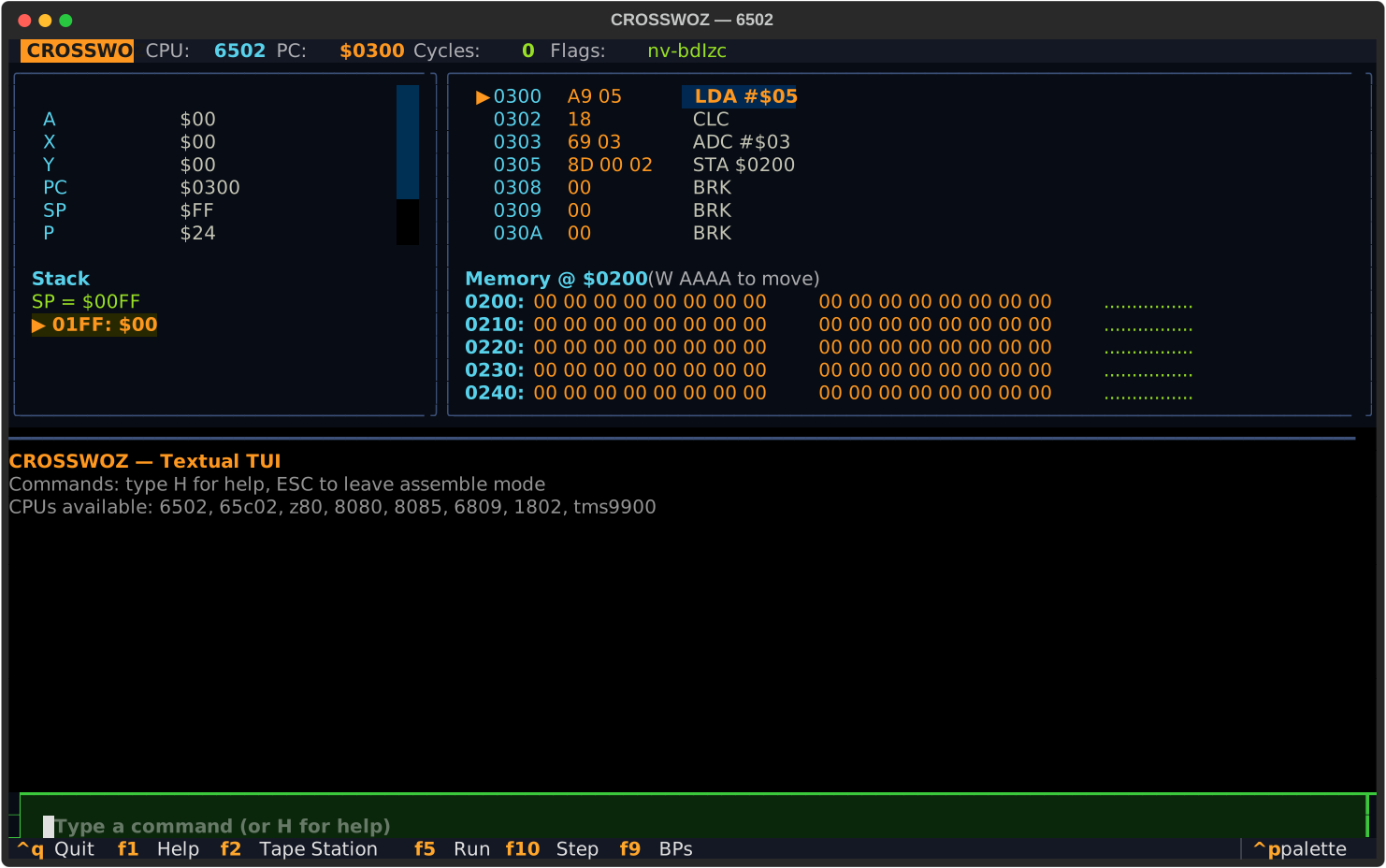
The bottom input is the command line. Everything you type goes through the same WOZMON/JMON-style command parser; the panes update reactively.
Keyboard shortcuts:
| Key | Action |
|---|---|
F1 |
Open the full-screen help |
F2 |
Open the Tape Station (browse and load tapes/) |
F5 |
Run from current PC |
F9 |
List breakpoints |
F10 |
Single step |
ESC |
Exit assemble mode / close a modal |
Ctrl+Q or Ctrl+C |
Quit |
The Textual layout is the canonical UI spec for CROSSWOZ. Future MiSTer FPGA and custom PCB implementations mirror the same regions: registers (with flash-on-change), disassembly (with PC arrow ▶ and breakpoint dots ●), memory dump (with W <addr> to watch), live stack, output log, command input.
The Monitor
All addresses are entered as hexadecimal. No $ or 0x prefix in monitor commands.
Many of these were lifted from Jeff Tranter’s excellent JMON for the KIM-1.
Memory inspection and editing
| Command | What it does |
|---|---|
AAAA |
Examine 8 bytes starting at AAAA |
AAAA.BBBB |
Examine the memory range AAAA..BBBB |
AAAA: XX YY ZZ |
Write the bytes XX YY ZZ starting at AAAA |
L AAAA XX YY |
Same idea, alternate syntax |
F S E XX [XX...] |
Fill range S..E with a byte pattern (cycles) |
C S E DEST |
Copy range S..E to DEST (overlap-safe) |
V S E DEST |
Verify range S..E matches the bytes at DEST |
S S E XX [XX...] |
Search range for a byte pattern, list every hit |
K S E |
16-bit checksum (sum of bytes mod 65536) of range |
Execution and debugging
| Command | What it does |
|---|---|
AAAAR |
Run from AAAA (halts on breakpoint or halt instruction) |
AAAAS |
Step one instruction at AAAA (sets PC first) |
. |
Single-step from current PC, no PC change |
T [count] |
Trace COUNT instructions from current PC (default 10), one line each |
B |
List breakpoints |
B N AAAA |
Set breakpoint #N (0..3) at AAAA (0000 to clear) |
B C |
Clear all breakpoints |
Code
| Command | What it does |
|---|---|
D AAAA |
Disassemble 10 instructions from AAAA |
A AAAA |
Enter the mini-assembler at AAAA (blank line or . exits) |
R |
Show the current CPU’s registers and flags |
System and utility
| Command | What it does |
|---|---|
= EXPR |
Hex math: = 1234, = FF00 - 02, = 1234 + 0077 (also shows decimal/signed) |
N |
System info: CPU, PC, reset vector, breakpoints |
CPU |
List available CPUs |
CPU z80 |
Switch to the Z80, keeping memory intact |
RESET |
Reset the current CPU |
SPEED [fast/period/N] |
Pace R runs. fast (default) is unpaced. period is the current CPU’s native clock (1 MHz 6502, 4 MHz Z80, etc.). N is a custom hertz target. Set CROSSWOZ_RUN_SPEED=period to default the hosted version. |
SAVE file.bin |
Save the entire 64K to disk |
LOAD file.bin |
Load a 64K snapshot from disk |
PUNCH FMT file S E |
Write range S..E to file in FMT (MOS / SREC / HEX / BIN) |
READ FMT file [ADDR] |
Read tape file (ADDR required only for BIN) |
FEED FMT |
Paste a tape from the terminal (MOS / SREC / HEX). Blank line or end-of-tape record finishes. ESC cancels. |
EJECT FMT S E |
Print a tape encoding to the log so you can select-and-copy it out of the browser. |
H or ? |
Help |
Q |
Quit |
The “halt” instruction for each CPU
A program ends when its CPU’s halt/break instruction executes. The monitor stops running and shows registers.
| CPU | Halt opcode |
|---|---|
| 6502 / 65C02 | BRK (with IRQ vector at $FFFE = 0) |
| Z80 | HALT |
| 8080 / 8085 | HLT |
| 6809 | SWI (with SWI vector at $FFFA = 0) |
| 1802 | IDL |
| TMS9900 | IDLE |
The five things you’ll do all the time
1. Look at memory
6502> 0300
0300: 00 00 00 00 00 00 00 00  00 00 00 00 00 00 00 00  ................
2. Write some bytes
6502> 0300: A9 42 00
Wrote 3 bytes at $0300
3. Disassemble what you just wrote
6502> D 0300
Disassembly (6502) from $0300:
0300  A9 42         LDA #$42
0302  00            BRK
4. Run it
6502> 0300R
Running 6502 from $0300... (Ctrl+C to stop)
Halted at $0303 after 2 instructions
   A = $42
   ...
5. Single-step
6502> 0300S
Executing: 0300  A9 42    LDA #$42
✓
   A = $42  PC = $0302  ...
JMON-style memory operations
Once you’ve got a program in memory, these are the commands that come up over and over.
Fill with a pattern
6502> F 0400 04FF 00
Filled $0400..$04FF with $00 (256 bytes)

6502> F 0500 050F DE AD BE EF
Filled $0500..$050F with pattern[DE AD BE EF] (16 bytes)

6502> 0500.050F
0500: DE AD BE EF DE AD BE EF  DE AD BE EF DE AD BE EF  ................
Copy and verify
6502> C 0500 050F 0600         ; copy 16 bytes from $0500 to $0600
Copied 16 bytes from $0500..$050F to $0600

6502> V 0500 050F 0600         ; confirm they match
Verify OK: 16 bytes match

6502> 0605: FF
6502> V 0500 050F 0600         ; one byte off?
Diff at offset 5: $0505=$AD  $0605=$FF
Verify FAILED: 1 mismatches
Search
6502> S 0000 FFFF DE AD BE EF
Match at $0500
Match at $0504
Match at $0508
Match at $050C
Total: 4 matches
Checksum
6502> K 0300 03FF
Checksum $0300..$03FF = $1A7C (6780)
Useful for sanity-checking that a program in memory hasn’t been corrupted between runs.
Hex math
6502> = 1234 + 0077
  $1234 + $0077 = $12AB  (4779, signed: 4779)

6502> = FF00 - 02
  $FF00 - $0002 = $FEFE  (65278, signed: -258)

6502> = 8000
  $8000 = 32768  (signed: -32768)  %1000000000000000
Breakpoints
The monitor checks PC against your breakpoints before each instruction. Hit one and Run stops with the CPU intact.
6502> A 0300
0300: LDA #$05
0302: CLC
0303: ADC #$03
0305: STA $0200
0308: BRK
0309: .

6502> B 0 0305          ; break before STA
Breakpoint #0 = $0305

6502> 0300R
Running 6502 from $0300... bps: $0305
Breakpoint at $0305
                  6502 Registers
                ...A = $08    (after the ADC)

6502> R                 ; same state, A=$08, PC=$0305
6502> .                 ; single-step the STA
Executing: 0305  8D 00 02  STA $0200
✓

6502> 0200              ; check the result landed
0200: 08 ...
Run resumes past the breakpoint on the first instruction so you don’t immediately re-trigger it. Four slots (0..3); B C clears all, B N 0000 clears slot N.
Trace
T [count] runs N instructions from the current PC, dumping each disassembled line with a compact register summary. Like a poor person’s debugger window.
6502> 0300S             ; step 1 to position PC at $0300
6502> T 5
Tracing 5 from $0300:
0300  A9 05         LDA #$05            A=05 X=00 Y=00 SP=FF P=24 | nv-bdIzc
0302  18            CLC                 A=05 X=00 Y=00 SP=FF P=24 | nv-bdIzc
0303  69 03         ADC #$03            A=08 X=00 Y=00 SP=FF P=24 | nv-bdIzc
0305  8D 00 02      STA $0200           A=08 X=00 Y=00 SP=FF P=24 | nv-bdIzc
0308  00            BRK                 A=08 X=00 Y=00 SP=FC P=24 | nv-bdIzc
Halted at $0309
The mini-assembler
Skip all the hand-encoding. The A <addr> command drops you into a line-at-a-time assembler in the KIM-1 / Apple-1 tradition. Each CPU has its own assembler matching its native syntax.
How it works
6502> A 0300
Assemble at $0300 (6502). Blank line or '.' to exit.
0300: LDA #$42                    ← you type a source line and press Enter
0300  A9 42                       ← CROSSWOZ echoes the bytes it assembled
0302: STA $0200
0302  8D 00 02
0305: BRK
0305  00
0306: .                           ← '.', blank line, or Esc exits
6502>
The address marker on the prompt advances by however many bytes the previous instruction took. There’s no separate “save” step — bytes go straight into memory as you assemble. The disassembly pane updates live so you can see what you’ve built.
Common conventions across all CPUs
| Form | Meaning |
|---|---|
$XX, $XXXX |
Hex (the universal prefix) |
XXh, XXXXh |
Intel-style hex (8080/8085 default, Z80 also accepts) |
0xXX |
C-style hex (Z80, 1802) |
%01010101 |
Binary |
42 |
Decimal |
; to end of line |
Comment |
Blank line or . |
Exit assemble mode |
Esc |
Exit assemble mode (TUI only) |
No labels, no macros, no symbols. This is a hex-monitor assembler: targets are absolute addresses you compute yourself or work out in advance.
Per-CPU syntax reference
Each subsection shows the addressing modes and a handful of representative instructions.
6502 / 65C02
| Mode | Syntax | Example |
|---|---|---|
| Implied | MNEM |
INX |
| Accumulator | MNEM A |
ASL A |
| Immediate | MNEM #$nn |
LDA #$42 |
| Zero page | MNEM $nn |
LDA $80 |
| Zero page, X | MNEM $nn,X |
LDA $80,X |
| Zero page, Y | MNEM $nn,Y |
LDX $80,Y |
| Absolute | MNEM $nnnn |
JMP $1234 |
| Absolute, X | MNEM $nnnn,X |
LDA $1234,X |
| Absolute, Y | MNEM $nnnn,Y |
LDA $1234,Y |
| Indirect | MNEM ($nnnn) |
JMP ($1234) |
| Indexed indirect | MNEM ($nn,X) |
LDA ($80,X) |
| Indirect indexed | MNEM ($nn),Y |
LDA ($80),Y |
| Relative | MNEM $nnnn |
BNE $0310 (assembler computes the offset) |
65C02 extras over 6502: STZ, BRA, PHX/PHY, PLX/PLY, INC A, DEC A, indirect-zp LDA ($50), JMP ($1234,X), TRB/TSB.
Z80
LD A,B               LD A,5               LD A,$42
LD A,(HL)            LD A,($1234)         LD ($1234),A
LD HL,$1234          LD HL,($1234)        LD ($1234),HL
LD (IX+5),B          LD A,(IY-10)         LD IX,$1234
ADD A,B              ADC A,$10            SUB (HL)
AND $0F              OR A                 CP B
INC HL               INC (IX+5)           DEC E
JP $1234             JP NZ,$1234          JP (HL)
JR $0200             JR Z,$0200           DJNZ $0200
CALL $0500           CALL NC,$0500        RET
RET Z                PUSH BC              POP HL
EX DE,HL             EX AF,AF'            EXX
ADD HL,DE            ADC HL,BC            SBC HL,DE
LDI    LDD    LDIR    LDDR                  ; ED-prefix block moves
CPI    CPD    CPIR    CPDR                  ; ED-prefix block compares
NEG    IM 0    IM 1    IM 2                 ; ED-prefix misc
BIT 7,A              RES 3,(HL)           SET 0,(IX+2)
RLCA   RLA   RRC B   RR (HL)   SLA L   SRL A
RST $00              RST $38              NOP
HALT                 DI                   EI
Conditions: NZ, Z, NC, C, PO, PE, P, M. Both $XX and XXh hex prefixes accepted.
8080 / 8085
Intel mnemonics — different from Z80 even when the underlying opcode is the same.
MOV A,B              MOV M,A              MOV C,M
MVI A,42H            MVI M,7H
LXI H,1234H          LXI B,0200H          LXI SP,F000H
LDA 0200H            STA 0200H            LDAX B              STAX D
LHLD 0200H           SHLD 0200H
ADD B   ADC B   SUB B   SBB B   ANA B   XRA B   ORA B   CMP B
ADI 5H  ACI 5H  SUI 5H  SBI 5H  ANI 5H  XRI 5H  ORI 5H  CPI 5H
INR A   DCR B   INX H   DCX D   DAD B
JMP 0500H            JZ 0500H            JNZ 0500H
JC 0500H             JNC 0500H           JP 0500H            JM 0500H
JPO 0500H            JPE 0500H
CALL 0500H           CZ 0500H            CC 0500H
RET   RZ   RNZ   RC   RNC   RP   RM   RPO   RPE
PUSH B    POP H    PUSH PSW    POP PSW
RST 0     RST 7
XCHG   XTHL   SPHL   PCHL
RLC   RRC   RAL   RAR
CMA   STC   CMC   DAA
IN 41H    OUT 80H
EI    DI    NOP    HLT
Conditions (encoded in mnemonic suffix): NZ, Z, NC, C, PO, PE, P, M.
8085 adds: RIM (read interrupt mask), SIM (set interrupt mask). Both are no-ops in the emulator (no real serial).
6809
LDA #$42             LDA $42 ; (extended)  LDA <$42 ; (direct, < prefix)
LDA $1234            LDA ,X                LDA $10,X
LDA ,X+              LDA ,X++              LDA ,-Y    LDA ,--Y
LDA A,X              LDA B,Y               LDA D,U
LDA [$1234]                                  ; extended indirect
LDA [$10,X]                                  ; indexed indirect
LDA $50,PCR                                  ; PC-relative
LDX #$1234           LDD #$1234            LDU #$F000
STA $1234            STX $1234,Y           STD ,X++
ADDA #$10            ADDD #$1234           ADCA $50
SUBA $50             SUBD $50              SBCA $50
ANDA #$0F            ORA #$80              EORA #$FF
CMPA #$05            CMPX #$1234           CMPY $50
TST $50              CLR $50               COM $50
NEG $50              INC $50               DEC $50
ASLA   ASRA   LSRA   ROLA   RORA
TFR A,B              TFR X,Y               EXG A,B
PSHS A,B,X,CC        PULS PC               PSHU D,Y
BRA $0200            BEQ $0200             BNE $0200
LBRA $0200           LBEQ $0200            LBSR $0200
JMP $1234            JMP ,X                JSR $1234
RTS                  RTI                   SWI    SWI2    SWI3
ABX                  SEX                   MUL
ORCC #$10            ANDCC #$EF
NOP                  SYNC
All the postbyte indexed forms work: 5-bit signed offset (-16..+15), 8-bit and 16-bit offsets, accumulator offsets (A,R / B,R / D,R), PC-relative (,PCR), and the indirect bracket form [...].
1802 (RCA CDP1802)
IDL                                  ; halt (00)
LDN R5         R0..R15 (or R0..RF)   ; D = M(Rn)
INC R5         DEC R5                ; Rn += / -= 1
LDA R5                               ; D = M(Rn); Rn++
STR R5                               ; M(Rn) = D
GLO R5         GHI R5                ; D = low/high byte of Rn
PLO R5         PHI R5                ; low/high byte of Rn = D
SEP R3                               ; P = 3 (R3 becomes PC -- subroutine call!)
SEX R2                               ; X = 2 (R2 becomes data pointer)
LDX                                  ; D = M(R[X])
LDI #$42                             ; D = $42
ORI #$0F   ANI #$0F   XRI #$AA   ADI #$05   SDI #$10   SMI #$10
ADD   SD   SM   AND   OR   XOR                  ; D op M(R[X])
SHR   SHL   SHRC   SHLC                          ; rotates/shifts via DF
ADC   SDB   SMB                                  ; with-carry variants
LDXA   STXD                                      ; load/store with R[X] auto-inc/dec
SAV   MARK                                       ; T register dance
REQ   SEQ                                        ; clear/set Q output flip-flop
RET   DIS                                        ; (X<<4|P) <- M(R[X]); also IE
BR $0210      BNZ $0210     BZ $0210     BDF $0210     BNF $0210
BQ $0210      BNQ $0210     SKP                  ; short branches (same-page only)
LBR $0500     LBNZ $0500    LBZ $0500    LBDF $0500
LBNF $0500    LBQ $0500     LBNQ $0500           ; long branches (full 16-bit target)
LSKP   LSNQ   LSNZ   LSNF   LSIE   LSQ   LSZ   LSDF
NOP                                              ; the C4 opcode
OUT 1   OUT 7   INP 1   INP 7                    ; stubbed I/O ports
Short branches replace only the low byte of PC, so they can only jump within the current 256-byte page. Long branches (LB*) take a full 16-bit address.
The 1802 calling convention is unique: there is no hardware stack. Subroutines work by SEP swapping which Rn is the program counter. See the 1802 walkthrough below for the canonical SEP-based “call and return” idiom.
What’s NOT supported
- No labels. All branch / jump / call targets are absolute hex addresses. (
BR $0210, notBR loop:.) - No macros, no
EQU, noDB/DS/ORGdirectives. This is a hex-monitor mini-assembler in the spirit of WOZMON’s “A” — not a full toolchain. For more complex programs, assemble externally and load withPUNCH/READorLOAD. - No multi-line statements. One instruction per line.
- No expressions.
LDA #$05+3won’t work. Compute the constant yourself (use the=command from the monitor if you need it).
Quick recipes
Loop that counts down a register on the 6502:
0300: LDX #$05
0302: DEX
0303: BNE $0302
0305: BRK
Same loop on the Z80 with DJNZ:
0100: LD B,5
0102: DJNZ $0102
0104: HALT
Z80 subroutine call:
; subroutine first
0200: LD A,$77
0202: RET

; caller
0100: LD SP,$F000
0103: CALL $0200
0106: HALT
6809 indexed copy of 4 bytes from $0500 to $0600:
; assumes $0500..$0503 has data
0400: LDX #$0500
0403: LDY #$0600
0406: LDA ,X+
0408: STA ,Y+
040A: CMPX #$0504
040D: BNE $0406
040F: SWI
Switching CPUs (the Cerberus trick)
The 64K memory bus is shared. Everything one CPU writes is visible to every other CPU.
6502> 0300: A9 42 8D 00 02 00     (LDA #$42 ; STA $0200 ; BRK)
6502> 0300R
                                  ; runs, memory[$0200] = $42

6502> CPU z80
Switched to Z80. PC=$0000

Z80> A 1000
1000: LD A,($0200)                ; reads what the 6502 wrote
1002: LD ($0201),A                ; copy it next door
1005: HALT
1006: .

Z80> 1000R
                                  ; memory[$0200] = $42, memory[$0201] = $42
Running a ROM with peripherals: IORUN and Apple-1 BASIC
R is enough when the program inside CROSSWOZ doesn’t need any I/O — it adds two numbers, runs to BRK, halts. Real programs like a BASIC interpreter need to read characters from a keyboard and write characters to a screen, and they expect those to live at specific addresses. CROSSWOZ models the Apple-1 PIA at $D010..$D013 as a set of memory hooks:
| Address | What it does |
|---|---|
$D010 (KBD) |
Read returns the latched keyboard byte (uppercase ASCII with bit 7 set). |
$D011 (KBDCR) |
Bit 7 = 1 when a key is ready. |
$D012 (DSP) |
Reads return 0 (always ready). Writes show up in the log (low 7 bits as ASCII; CR starts a new line). |
$D013 (DSPCR) |
Ignored. |
IORUN AAAA is the command that boots a ROM with those peripherals wired up. It does five things:
- Attaches the Apple-1 KBD/DSP peripheral to the shared memory bus.
- Sets the current CPU’s PC to
AAAAand clears its halt flag. - Starts a background task that runs the CPU at the current
SPEEDsetting. - Disables the command prompt and routes every keystroke into the keyboard buffer at
$D010— so what you type is going to the running program, not to the monitor. Clipboard paste works too; the whole pasted text gets queued at once. - Watches for
ESC, which stops the run and returns you to the prompt.
The registers, disassembly, stack, and memory panes refresh ~20 times per second while IORUN is active, so W 0100 during a FOR loop will visibly churn the stack page, W 0080 will show the floating-point accumulator working, and so on. Memory you wrote during the run is preserved when IORUN exits — disassemble it, examine it, then IORUN again to restart.
Two BASICs ship as paper tape today, both for the 6502.
Apple-1 Integer BASIC (Wozniak, 4 KB)
Loaded at $E000 and started at $E000. Integer-only, but it’s the original — the BASIC that shipped with the Apple-1.
6502> READ MOS tapes/apple1-basic.mos
Read 4096 bytes (MOS) into memory at $E000

6502> IORUN E000
IORUN: 6502 from $E000 with Apple-1 KBD/DSP at $D010..
>                                ; BASIC's prompt
PRINT 2+3
5

>10 FOR I=1 TO 5
>20 PRINT I*I
>30 NEXT I
>RUN
1
4
9
16
25
Microsoft 6502 BASIC (OSI variant, 8 KB)
Microsoft’s 1977 BASIC for the 6502 in the Ohio Scientific port, patched by Jeff Tranter to use the Apple-1’s $D010/$D012 keyboard and display. Has floating point, GOSUB/RETURN, string handling, and the famous Microsoft Easter egg.
Important: at the MEMORY SIZE? prompt, type a number (e.g., 24000) rather than pressing Enter. This is a RAM-resident BASIC, and pressing Enter triggers a memory scan that walks up from $0300 writing test patterns. It hits BASIC’s own code around $7D8F and overwrites the very loop doing the scan, hanging the emulator. The original NOTES.txt warns about this. Anything safely below $6000 (the BASIC load address) works; 24000 is the value Jeff Tranter suggests.
6502> READ MOS tapes/osi-msbasic.mos
Read 7913 bytes (MOS) into memory at $6000

6502> IORUN 7D0D
IORUN: 6502 from $7D0D with Apple-1 KBD/DSP at $D010..
MEMORY SIZE? 24000
TERMINAL WIDTH? 40

23486 BYTES FREE

OSI 6502 BASIC VERSION 1.0 REV 3.2
COPYRIGHT 1977 BY MICROSOFT CO.

OK
PRINT 2*ATN(1)*4
 3.14159265

OK
10 FOR I=1 TO 5: PRINT I, SQR(I): NEXT
RUN
 1            1
 2            1.41421356
 3            1.73205081
 4            2
 5            2.2360679

OK
10 PRINT CHR$(47+INT(RND(1)*2)*45);:GOTO 10
RUN
\//\///\/\\//\\\\/\/\//\\\\\///\\//\/\\//\\//\\/\/\/\\\/\/\\///\\/...
The last one is 10 PRINT, the canonical maze one-liner. RND(1)*2 is 0..2, INT() rounds down to 0 or 1, times 45 gives 0 or 45, plus 47 selects / (ASCII 47) or \ (ASCII 92). The trailing ; suppresses the newline so the characters wrap and scroll forever. Press ESC to break out.
Easter egg: at the MEMORY SIZE? prompt, type A and Enter. The BASIC will print WRITTEN BY RICHARD W. WEILAND. and re-prompt.
ESC quits either BASIC back to the monitor. The 64K is intact afterward, so you can disassemble, examine, and IORUN again to restart.
Period-realistic speeds
By default R runs at native Python speed, which is millions of instructions per second. That’s great for “show me the answer” but it makes the early-1980s timing of loops, animations, and printed output invisible. The SPEED command paces the run to match what the chip would have done at its real clock.
6502> SPEED period
Speed: paced to 1.000 MHz

6502> 0300R
Running 6502 from $0300... (paced at 1.00 MHz)
                                  ; the same little add now takes period-correct time
Each CPU declares a sensible default clock: 1 MHz for the 6502 and 6809, 2 MHz for the 65C02 (Apple //e Enhanced) and 8080 (Altair), 3 MHz for the 8085 and TMS9900 (TI-99/4A), 4 MHz for the Z80 (CP/M), and 1.76 MHz for the 1802 (the Voyager clock). SPEED period re-resolves whenever you switch CPUs.
SPEED 100000 paces to a custom hertz target. SPEED fast (default) disables pacing. The hosted browser version can be defaulted to period speed by setting CROSSWOZ_RUN_SPEED=period in the service’s environment.
The 6502 tracks cycles accurately per opcode. The other CPUs add their cycles_per_inst average per step — enough for “feels right” timing, not bit-accurate to the silicon.
Per-CPU walkthroughs
Each section shows one or two minimal programs. Type them directly into the A assembler.
6502 — Add two numbers
6502> CPU 6502
6502> A 0300
0300: LDA #$05
0302: CLC
0303: ADC #$03
0305: STA $0200
0308: BRK
0309: .

6502> 0300R
                                  ; A = $08
6502> 0200
0200: 08 ...                      ; result stored at $0200
Why CLC first? ADC always adds the carry flag. Clearing it first guarantees you’re adding two numbers, not two numbers plus a stray carry.
6502 — Count down to zero with a branch
6502> A 0320
0320: LDX #$05
0322: DEX
0323: BNE $0322                   ; loop until X=0
0325: BRK
0326: .

6502> 0320S 0320S 0320S 0320S     ; step a few times if you like
6502> 0320R                       ; or just run it; X ends at 0
65C02 — STZ and INC A
These are the two most-used CMOS additions. STZ zeroes memory in one instruction; INC A lets you increment the accumulator directly (the NMOS 6502 couldn’t).
6502> CPU 65c02
65C02> A 0300
0300: LDA #$FF
0302: STZ $0200                   ; mem[$0200] = 0
0305: INC A                       ; A = $00 (wraps)
0306: INC A                       ; A = $01
0307: BRA $030A                   ; unconditional branch (also new)
0309: BRK                         ; skipped
030A: STA $0201
030D: BRK
030E: .

65C02> 0300R
65C02> 0200.0202                  ; check the results
Z80 — Sum 1..5 with DJNZ
DJNZ decrements B and branches back if non-zero. Idiomatic Z80 for fixed-iteration loops.
65C02> CPU z80
Z80> A 0100
0100: LD A,0
0102: LD B,5
0104: ADD A,B                     ; A += B
0105: DJNZ $0104                  ; B--, loop if B != 0
0107: LD ($0200),A                ; store result
010A: HALT
010B: .

Z80> 0100R
                                  ; A = 15 (5+4+3+2+1)
Z80> 0200
0200: 0F ...                      ; $0F = 15
Z80 — CALL / RET
Z80> A 0200                       ; subroutine first
0200: LD C,$77
0202: RET
0203: .

Z80> A 0100
0100: LD SP,$F000                 ; set up stack
0103: CALL $0200
0106: HALT
0107: .

Z80> 0100R                        ; C ends at $77
8080 — Intel mnemonics for the same idea
Note the syntax differences vs Z80: MVI instead of LD r,n, LXI instead of LD rp,nn, MOV instead of LD r,r', H suffix for hex.
Z80> CPU 8080
8080> A 0100
0100: MVI A,5H                    ; A = 5
0102: ADI 3H                      ; A = A + 3 = 8
0104: STA 0200H
0107: HLT
0108: .

8080> 0100R
8080> 0200                        ; mem[$0200] = $08
8080 — LXI and DAD (16-bit add)
8080> A 0120
0120: LXI H,1000H                 ; HL = $1000
0123: LXI B,0234H                 ; BC = $0234
0126: DAD B                       ; HL = HL + BC = $1234
0127: HLT
0128: .

8080> 0120R
                                  ; H = $12, L = $34
8085 — RIM / SIM
Same as the 8080, plus RIM (read interrupt mask) and SIM (set interrupt mask). In this emulator both are no-ops since there’s no real serial I/O.
8080> CPU 8085
8085> A 0100
0100: RIM
0101: MVI A,5H
0103: ADI 3H
0105: SIM
0106: STA 0200H
0109: HLT
010A: .

8085> 0100R                       ; behaves like the 8080 program
6809 — Big-endian world
The 6809 stores 16-bit values high byte first. Notice STX $0204 writes $12 $34 in that order in memory.
8085> CPU 6809
6809> A 0400
0400: LDA #$05
0402: ADDA #$03                   ; A = $08
0404: STA $0200
0407: LDX #$1234
040A: STX $0204
040D: SWI                         ; halt
040E: .

6809> 0400R
6809> 0200.020A
0200: 08 00 00 00 12 34 ...       ; STX is high-then-low: 12 34
6809 — Postbyte indexed addressing
The 6809’s defining feature. ,X+ is “read what X points to, then bump X by one” — like C’s *x++.
6809> 0500: AA BB CC DD           ; some data
6809> A 0600
0600: LDX #$0500
0603: LDA ,X+                     ; A = $AA, X = $0501
0605: LDB ,X+                     ; B = $BB, X = $0502
0607: SWI
0608: .

6609> 0600R
                                  ; A = $AA, B = $BB, X = $0502
1802 — The COSMAC ELF style
The 1802 is unlike everything else. There are no fixed PC or stack registers — instead any of R0..R15 can be the PC, selected by P. By default P=0, so R0 is the PC. Subroutines work by SEPping over to another register set up as the routine’s PC. There is no hardware stack at all.
D is the 8-bit accumulator. DF is the single carry flag.
Add two numbers, store via a data pointer
6809> CPU 1802
1802> A 0000
0000: LDI #$30                    ; D = $30
0002: PLO R2                      ; R2 low byte = $30, R2 = $0030
0003: GHI R0                      ; D = R0 high byte = $00 (R0 is PC)
0004: PHI R2                      ; R2 = $0030
0005: LDI #$77                    ; D = $77
0007: STR R2                      ; mem[R2] = mem[$0030] = $77
0008: IDL                         ; halt
0009: .

1802> 0R                          ; run from $0000
                                  ; mem[$0030] = $77
1802> 0030
0030: 77 ...
A long branch over some skipped code
1802> A 0000
0000: LBR $0100                   ; long branch to $0100
0003: LDI #$BB                    ; <- skipped
0005: IDL
0006: .

1802> A 0100
0100: LDI #$AA
0102: IDL
0103: .

1802> 0R
                                  ; D = $AA (the second LDI ran, the first didn't)
The “SEP trick” (Iconic 1802 idiom)
You set up another register as the subroutine’s PC, then SEP to it. The subroutine SEPs back to the caller’s register. This is how the 1802 does subroutine calls without a hardware stack.
1802> A 0000
0000: LDI #$50                    ; build R3 = $0050 (the subroutine address)
0002: PLO R3
0003: GHI R0
0004: PHI R3
0005: SEP R3                      ; jump to subroutine; R3 becomes PC
0006: LDI #$EE                    ; <- subroutine "returns" here
0008: IDL
0009: .

1802> A 0050                      ; the "subroutine"
0050: LDI #$AA                    ; do work in D
0052: SEP R0                      ; switch PC back to R0 (the caller)
0053: .

1802> 0R
                                  ; D = $EE after the LDI following the SEP
That’s the entire 1802 calling convention, and why it shipped on spacecraft: trivial to implement, radiation-tolerant CMOS, low parts count.
TMS9900 — The workspace-pointer trick
The TMS9900 is the only 16-bit CPU in CROSSWOZ and the only one with the famous TI architectural quirk: the “registers” R0..R15 aren’t on-chip silicon, they’re sixteen consecutive 16-bit words of RAM pointed at by the WP (workspace pointer) register. Context switching is just changing WP. By default CROSSWOZ boots the TMS9900 with WP = $83E0 and PC = $0500.
The mini-assembler uses TI’s traditional >hex syntax for numbers and the four addressing forms Rn, *Rn, @>xxxx or @>xxxx(Rn), and *Rn+.
Add two numbers
1802> CPU TMS9900
TMS9900> A 0500
0500: LI   R0,>1234                  ; R0 = $1234
0504: LI   R1,>5678                  ; R1 = $5678
0508: A    R0,R1                     ; R1 = R1 + R0 = $68AC
050A: MOV  R1,@>0200                 ; mem[$0200..0201] = $68AC big-endian
050E: IDLE                           ; halt
0510: .

TMS9900> 500R
TMS9900> 0200
0200: 68 AC ...
BL/B subroutine convention
The TMS9900 has no hardware stack. BL (Branch and Link) saves the return address into R11 and jumps to the target; the subroutine returns via B *R11. If the subroutine wants to call further routines, it has to save R11 first.
TMS9900> A 0500
0500: BL   @>0600                    ; jump to subroutine at $0600, R11 = return addr
0504: MOV  R5,@>0200                 ; sub left $00AA in R5
0508: IDLE
050A: .

TMS9900> A 0600                      ; the subroutine
0600: LI   R5,>00AA                  ; do work in R5
0604: B    *R11                      ; "return"
0606: .

TMS9900> 500R
                                     ; mem[$0200..0201] = $00AA
LWPI: change the workspace, change the registers
The whole register file moves with WP. LWPI (Load Workspace Pointer Immediate) is the canonical context switch.
TMS9900> A 0500
0500: LI   R0,>DEAD                  ; R0 in the current workspace at $83E0
0504: LWPI >8400                     ; new workspace at $8400 — totally different R0..R15
0508: LI   R0,>BEEF                  ; this R0 lives at $8400
050C: IDLE
050E: .

TMS9900> 500R
TMS9900> 83E0
83E0: DE AD ...                      ; the first workspace's R0
TMS9900> 8400
8400: BE EF ...                      ; the second workspace's R0
Not implemented
CROSSWOZ models a CPU with shared RAM and no external hardware, so two TMS9900 features that depend on off-chip pins are skipped:
- CRU bit ops (
SBO,SBZ,TB,LDCR,STCR) — these talk to the Communications Register Unit, an external serial I/O bus. Without that bus, they have nothing to do. - XOP (extended operation) — a software-interrupt-style mechanism that uses transfer vectors at fixed addresses. Skipped for now; could be added if we want.
Everything else (Formats I, II, III, V, VI, VII, VIII, and IX, including BLWP, RTWP, MPY, DIV) is implemented.
Save and resume
6502> 0300: A9 42 8D 00 02 00
6502> SAVE workspace.bin
Saved 64K to workspace.bin

6502> Q

$ python main.py
6502> LOAD workspace.bin
Loaded workspace.bin
6502> D 0300
0300  A9 42         LDA #$42
0302  8D 00 02      STA $0200
0305  00            BRK
Snapshots are just the raw 64K memory image. The CPU register state is not saved; switching CPUs resets the new CPU’s registers but leaves memory untouched.
Paper tape: PUNCH and READ
For sharing programs between systems (and being a little period-correct about it), CROSSWOZ supports four paper-tape formats:
| Format | Best for | File extension by convention |
|---|---|---|
MOS |
KIM-1 native, 6502 work | .pap or .mos |
SREC |
6800/6809 work, robust general use | .s19 or .srec |
HEX |
8080/8085/Z80 work, sharing with other emulators | .hex |
BIN |
Raw byte dumps, snapshots that aren’t text | .bin |
Punch a range to a file
6502> A 0300
0300: LDA #$42
0302: STA $0200
0305: BRK
0306: .

6502> PUNCH SREC /tmp/myprog.s19 0300 0305
Punched 6 bytes (SREC) from $0300..$0305 -> /tmp/myprog.s19
The resulting file:
$ cat /tmp/myprog.s19
S109 0300 A9 42 8D 00 02 00 89
S903 0300 F9
(Spaces added for readability — real output has none.)
Read a tape back
6502> F 0300 0305 00
Filled $0300..$0305 with $00 (6 bytes)

6502> READ SREC /tmp/myprog.s19
Read 6 bytes (SREC) from /tmp/myprog.s19 -> $0300..$0305

6502> D 0300
0300  A9 42         LDA #$42
0302  8D 00 02      STA $0200
0305  00            BRK
The text formats (MOS, SREC, HEX) carry their own load addresses, so READ doesn’t need one. BIN is just raw bytes, so you must say where:
6502> READ BIN /tmp/myprog.bin 0400
Read 6 bytes (BIN) from /tmp/myprog.bin -> $0400..$0405
Why four formats?
Each came out of a different ecosystem:
- MOS Technology hex paper tape was what an actual KIM-1 wrote with its teletype paper-tape punch. If you’re typing programs from a 1976 Byte magazine listing, this is what you’d see.
- Motorola S-records were the canonical text format for 6800/6802/6809 systems and remain widespread for embedded firmware.
- Intel HEX was the canonical format for 8080/8085/Z80 work and is still the standard for AVR, PIC, and most modern microcontrollers.
- Raw binary is just bytes — useful for partial-memory snapshots when you don’t need (or want) human-readable framing.
All four use the same PUNCH / READ commands; only the format name changes.
FEED and EJECT: paper tape through the terminal
PUNCH and READ use the local filesystem, which is fine for the desktop build but is closed off in the hosted browser version for obvious reasons. The same paper-tape semantics are available through FEED and EJECT, which use the terminal itself as the medium.
6502> FEED MOS
Feed mode: paste a MOS paper tape, then press Enter on a blank line.
[paste the tape lines here; the EOF record auto-finalizes]
Fed 9 bytes (MOS) into $0300..$0308
FEED accepts MOS, SREC, or HEX (binary doesn’t survive a terminal round-trip). Each pasted line is buffered until a blank line or the format’s end-of-tape record is seen, then the tape is parsed, loaded into memory, and the read animation plays. ESC cancels feed mode without loading anything.
6502> EJECT MOS 0300 0308
-- paper tape (MOS, 9 bytes from $0300) --
;090300A9051869038D00020001CD
;0000010001
-- end of tape --
Select-and-copy the lines above to keep the tape.
EJECT is the inverse: it prints the encoded tape into the log so you can select-and-copy it out of the browser, then paste it back later with FEED. The punch animation plays at the same time for the visual.
Bad checksums are caught
6502> READ MOS /tmp/corrupted.mos
Tape format error: MOS checksum mismatch at $0300: got $FFFF, expected $089B
CROSSWOZ verifies the checksum on every record. Tampered or corrupted tapes fail loudly instead of silently loading wrong bytes.
The Tape Station (F2)
Press F2 from the TUI to open the Tape Station: a full-screen overlay for browsing and loading tapes from the tapes/ directory at the repo root.
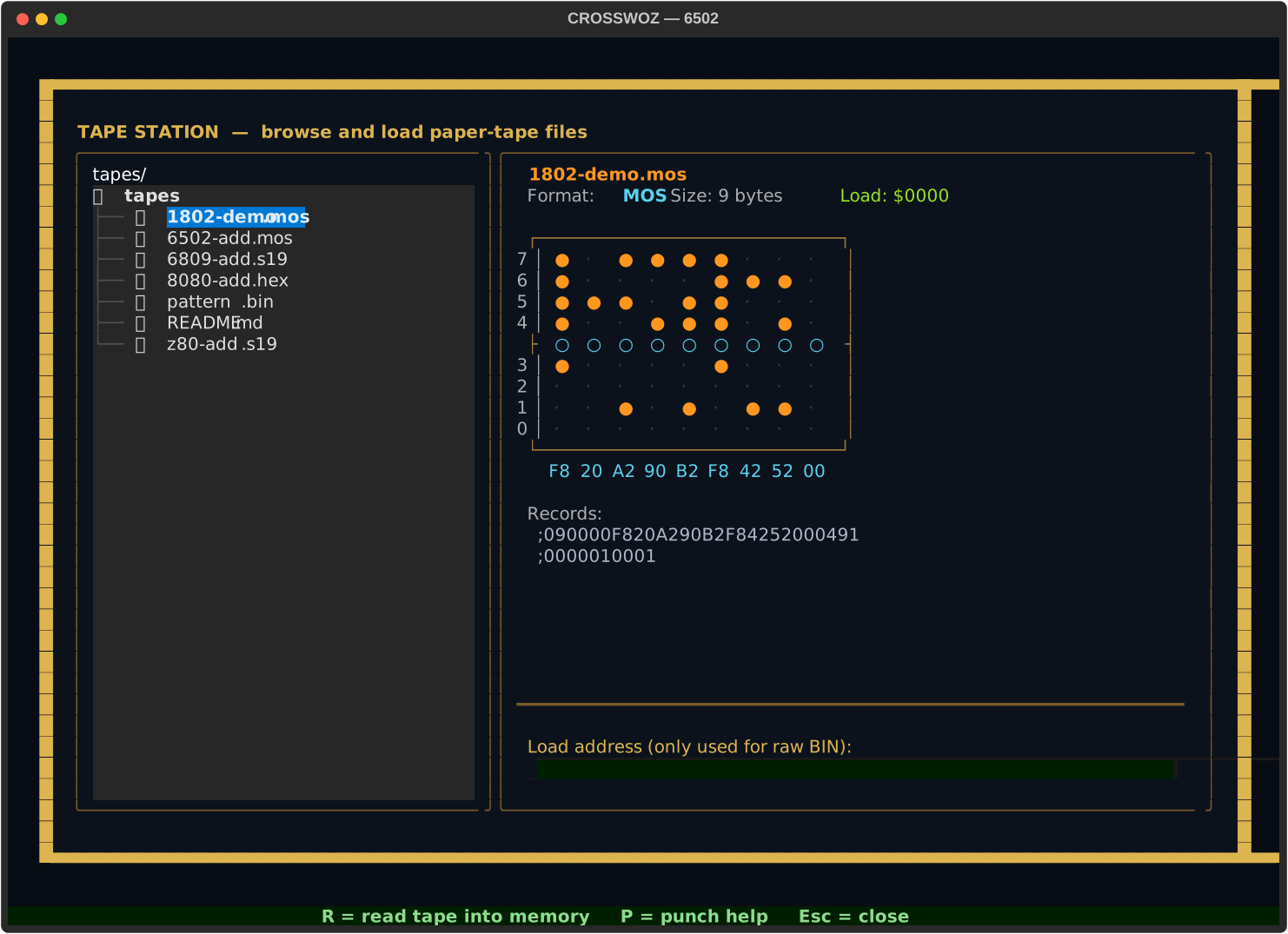
- Left: a directory tree of
tapes/. Click a file (or arrow-key + Enter) to select it. - Right: a preview of the selected tape — sprocketed ASCII rendering of the first 24 bytes, plus the format, byte count, load address, and the first few raw records for the text formats.
- Bottom: an address field (only used for raw
BINfiles; the text formats carry their own load addresses) and the action keys:R— read the tape into memoryP— show punch help (you write tapes from the command line)Esc— close the modal
Pre-loaded sample tapes live in tapes/ (one per CPU, demonstrating each format). See tapes/README.md.
Live tape animation
Every PUNCH and READ now plays a teletype-style animation on a strip just above the command input — each byte’s bit pattern appears as punched holes on a sprocketed tape, accompanied by the terminal bell. Bytes appear at ~8 per second (roughly one-third the speed of a real ASR-33 teletype, which felt right for watching); tapes longer than 48 bytes are animated for the first 48 then snap-finished, with the final stretch shown statically.
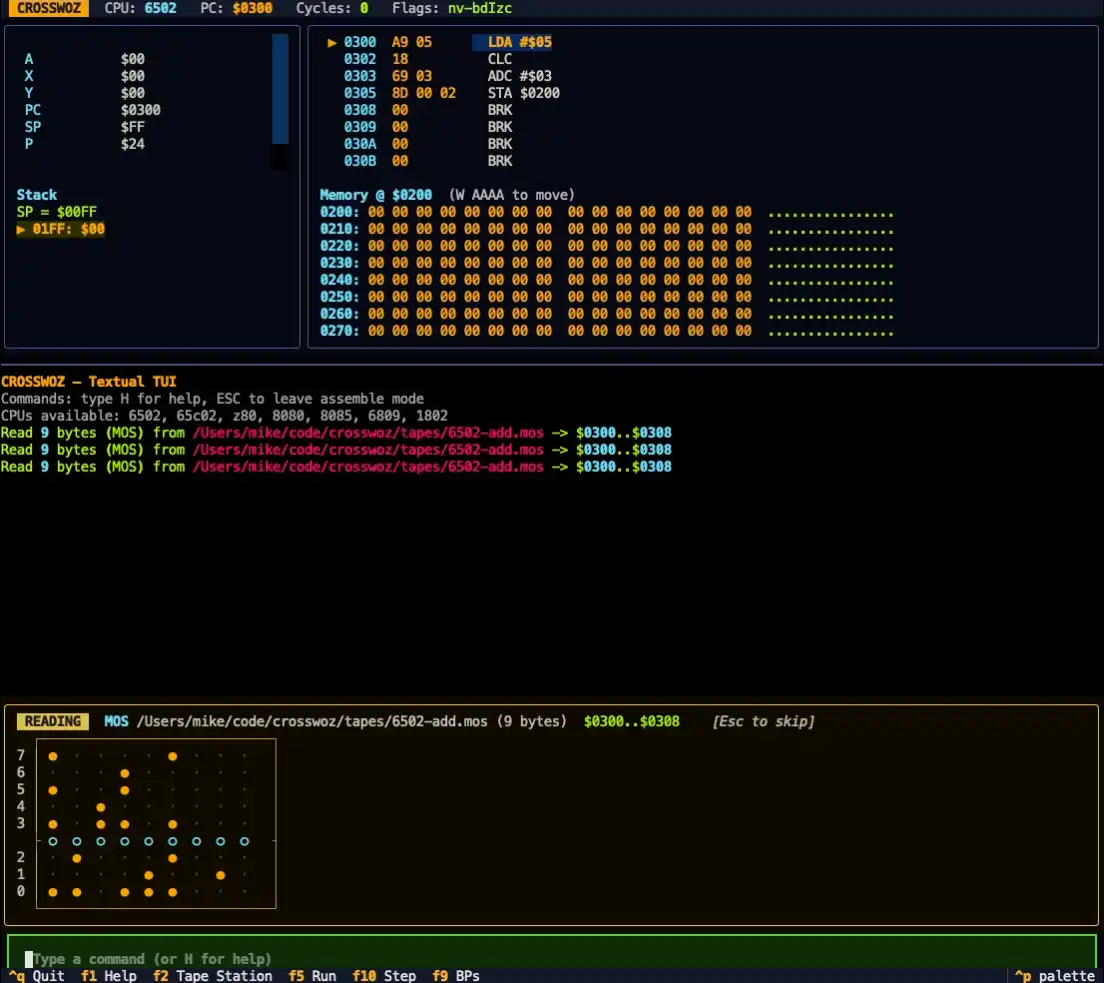
This is decoration — the operation is already complete by the time the animation plays — but it makes paper tape feel like paper tape. If a tape is taking too long, the animation does not block the command line; you can keep typing.
Tips and gotchas
- Numbers are hex everywhere in monitor commands, no
$needed. Inside the assembler, the per-CPU syntax rules — 6502 uses$42, 8080/8085 use42H, Z80 accepts both. - The IRQ vector ($FFFE) is shared between 6502 and 6809: 6502 uses it for BRK; 6809 uses the same word as its reset vector. Leave it as
00 00for both to halt cleanly. - Run is bounded at 100,000 instructions to prevent runaways. Press Ctrl+C any time.
- Switching CPUs resets the new core’s registers (PC, accumulator, etc.) but never touches memory.
- The 1802’s “PC” is whichever Rn
Ppoints to. UseRin the monitor to see all 16 registers and which one is currently the program counter.